
Sales context
Pipelines, decisions, and follow-up stay visible
Use visual sales views, ownership, activities, project context, and history to understand what needs attention next.
Fenix CRM connects customer records, pipelines, Kanban, onboarding, products, inventory, sales documents, projects, communication, billing, integrations, reporting, and durable workflow automation in one tenant-aware workspace.
The current product screenshot is combined with temporary Early Access visual media so the page explains how the product feels as well as what it can do.
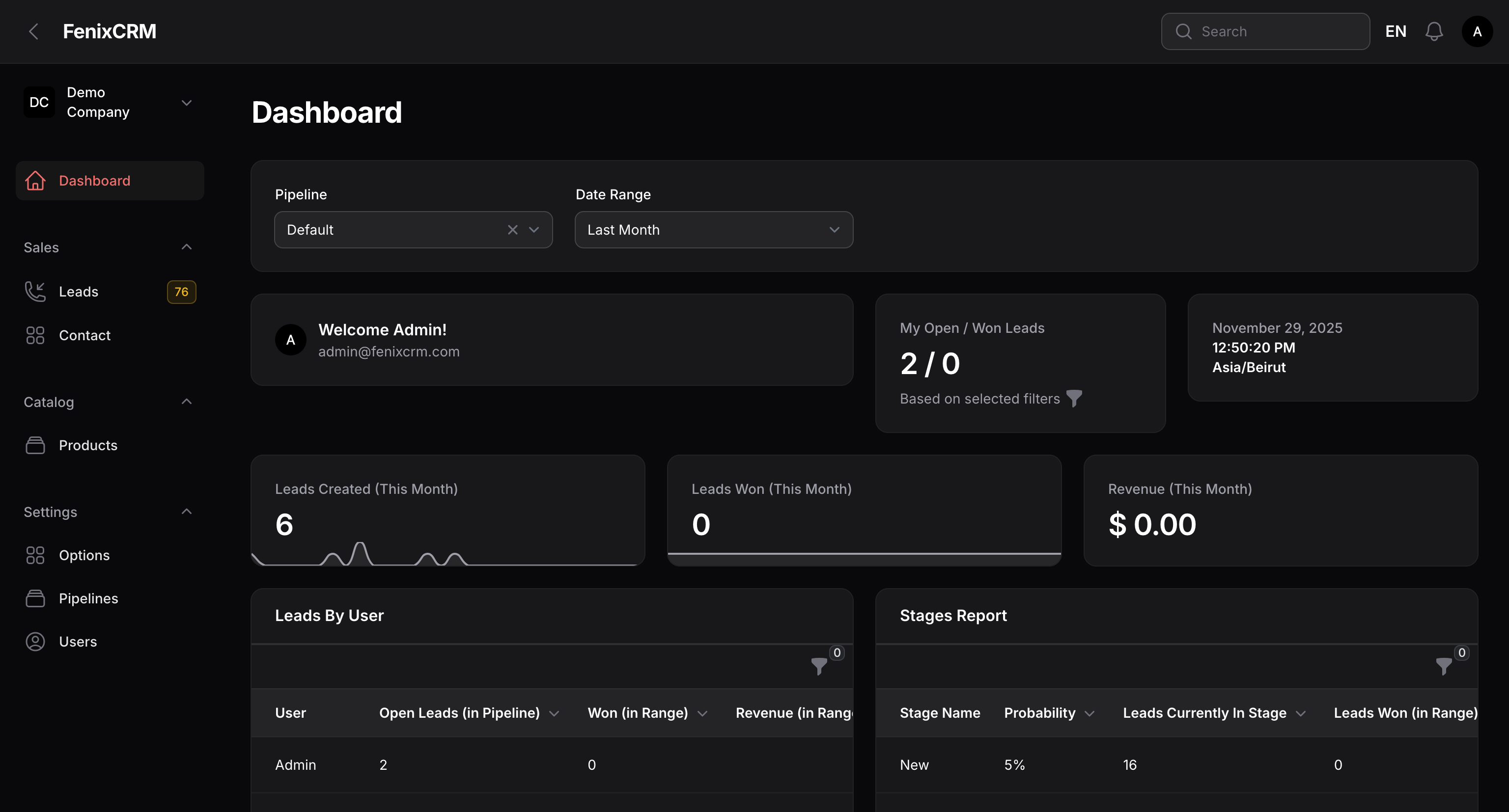
The application keeps customer context, commercial work, communication, and operational actions close together instead of sending users through disconnected tools.
Use visual sales views, ownership, activities, project context, and history to understand what needs attention next.

Sales, operations, projects, and communication can work from the same underlying company and customer records.
Illustrative stock media is temporary during Early Access and can be replaced with final Fenix CRM product recordings and screenshots.
Each area has its own data and UI, while the records remain connected so the team does not rebuild customer context in every module.
Leads, pipelines, stages, ownership, stage history, activities, followers, targets, and Kanban views.
Available nowPeople, organizations, contact groups, notes, tags, timelines, relationships, followers, and custom fields.
Available nowProduct catalog, warehouses, stock balances, movement history, and operational stock context.
Available nowQuotations, invoices, document sequencing, reusable templates, products, and customer context.
Available nowDefinitions, versions, triggers, conditions, actions, enrollment, durable waits, retries, runs, and recovery.
Available nowWhatsApp Business, SMTP, multilingual email templates, API keys, Webhooks, and public Web Forms.
Available nowProjects, membership, access teams, sales handoff, onboarding flows, steps, progress, preferences, and conditions.
Available nowImports, exports, dashboards, metrics, operational summaries, structured data capture, and audit-oriented context.
Available nowFenix CRM is intentionally modular, but the modules are designed to hand context to each other. These deeper sections show the product as workflows rather than isolated checkboxes.
Track ownership, qualification, stage movement, next actions, related people, organizations, projects, and customer history without losing the original lead context.

Design versioned workflows with visual nodes and edges, publish safely, enroll matching records, inspect runs, and recover work that waits or needs another attempt.

Create onboarding flows and steps that adapt to the company, panel, progress, preferences, and conditions instead of relying on one static welcome checklist.

Connect WhatsApp Business and SMTP, reuse translated email templates, expose controlled APIs, accept Web Forms, and publish outbound Webhooks without splitting customer history across systems.

Commercial operations stay connected to the same customer and project context, giving teams a clearer line from what is being sold to what is being delivered.

Tenancy, access control, subscriptions, plans, localization, CMS content, and integration boundaries provide the platform layer that the CRM modules rely on.
These temporary Early Access videos are illustrative stock footage. The section is ready for real Fenix CRM screen recordings as soon as they are available.
Use this slot for a short Workflow builder and run-history recording when the final product capture is ready.
Use this slot for a real end-to-end CRM journey showing sales, communication, projects, and billing working together.
The goal is not to create more tabs. It is to preserve context as work moves between people, modules, and automation.
Create or import a lead, receive a Web Form, or accept external data through controlled integration entry points.
Assign ownership, move through pipeline stages, schedule activities, and keep notes and structured fields.
Connect products, quotations, invoices, project context, and the commercial decision.
Continue work through projects, access teams, targets, onboarding, and operational context.
Enroll records into versioned workflows, wait durably, retry safely, and inspect execution history.
Use WhatsApp, SMTP, multilingual templates, Webhooks, and external integrations around the same record.
Use dashboards, exports, reporting surfaces, audit context, and Changelog-backed product transparency.
The list below is grounded in the modules, models, settings, migrations, merged work, and application surfaces represented in the repository. Some behavior is still being hardened during Early Access.
Core customer and pipeline records for accountable sales work.
Commercial operations kept close to the customer and sales process.
A versioned, tenant-aware automation runtime instead of one-request-only rules.
Provider configuration and controlled external boundaries for moving data and messages.
Continue work after the sale with project-aware access and responsibility.
Structured guidance for configuring and adopting each workspace.
Commercial SaaS controls for plans, access, review, and subscription changes.
Foundations required for a multi-company SaaS product rather than a single-team database.
Public product education and discovery surfaces managed inside the same modular application.
These items are intentionally separated from current features. They describe product direction and may change, be reduced, or be reordered based on validation and technical priorities.
Deeper Google account, calendar, mail, and productivity integration beyond generic SMTP/API/Webhook paths.
Deeper Microsoft account, calendar, mail, and productivity workflows.
Move beyond generic Webhooks to authenticated Slack triggers, actions, and notifications.
Complete Facebook/Instagram Lead Ads ingestion and richer Click-to-WhatsApp attribution.
More configurable dashboards, funnel analysis, forecasts, cohort views, and operational BI.
Two-way scheduling and meeting context connected to CRM activities.
More resilient field workflows for users working away from a desktop connection.
Optional summarization, classification, drafting, and insight generation with explicit authorization boundaries.
Reusable integrations for accounting, automation, communication, storage, and business applications.
SSO, SCIM, and enterprise provisioning when customer requirements justify them.
Native synchronization paths for accounting systems instead of relying only on generic APIs and exports.
Controlled external access for customers to selected documents, project information, requests, or collaboration.
More formal review, approval, and signature steps around sales and operational documents.
Extend the unified communication model beyond current WhatsApp and email-oriented surfaces.
More direct paths into analytics warehouses and external BI tools for larger reporting workloads.
Anything in the current capability matrix is represented in the application today, although Early Access items can still change. Roadmap items are not commitments and should not be used as a promise of a delivery date.
Review the changelogStart a trial to test the current product, or talk with the team about requirements that depend on Early Access or roadmap capabilities.